Zimei TechnologyEnterprise AI · Development and delivery
EnglishEN
Discuss a project

01 / Delivery goal

What will staff be able to do when the project is finished?

We turn the agreed functions into a working system, submit it in stages for staff to check, then hand over the versions, materials and access needed to take it over, as agreed.

Once requirements, scope and the quotation are agreed, stage submissions, staff trials, launch and acceptance put the agreed results into the client’s hands. This page explains how we move that work forward and arrange support after handover.

When the project is finished, the people using the system should be able to move their original task forward. For policy enquiries, for instance, work that once meant asking a knowledgeable colleague to find a document and identify the right version should become something an employee can do with their own account: find content the client has confirmed as valid, open the source and complete the reply. We agree with the client on the task this phase will support and make clear how far it must go. At delivery, people in the actual role work through it themselves. That is how everyone can see whether the step that once needed someone else's help has truly passed into the user's hands.

Part 1 / 01—10

First, understand what is being bought

From business outcomes, scope and deliverables to the first hands-on version, make clear what this investment brings.
02Delivery goal

What does getting this task right change for the business?

A policy question can look like one person's small concern. Behind it, a colleague may have to pass the question on, someone familiar with the policy stops their work to find the document, and the answer travels back through the same people. When that happens repeatedly, the people who know the business struggle to set aside uninterrupted time for work that needs their judgement. To see whether the project has helped, follow these enquiries: which searches can the person asking now complete, which still go to a knowledgeable colleague, and whether those referrals are about missing information or a genuine need for business judgement. That distinction says more about the change in everyday work than a few extra system entry points.

The same small task · how it used to work
  1. An employee asks
  2. A colleague passes the question on
  3. A knowledgeable colleague stops work to find a document
  4. The answer is passed back
The change the project lead wants to see after this phase

The person asking takes back the task of finding confirmed information. People who know the policies can reserve their time for exceptions that need judgement, rather than repeatedly acting as the route to a document.

Check whether the knowledgeable colleague is interrupted less

Compare similar questions: how many still go to that colleague, and how many the person asking can now complete independently. The extent of any improvement comes from the project’s actual records.

03Scope and boundaries

How far are we responsible for taking this phase?

“Build an enterprise knowledge base” does not yet say how far this phase will go. Administration may mean checking approval policies; sales may mean looking up product information. Technical staff also need to know which systems supply the material and which roles may view it. Each interpretation makes sense, but the information to connect and the work to build differ. Before work starts, we choose the task staff will actually perform in this phase. With the client, we establish where it begins, which material it uses and what a particular role must complete at the end. Requirements, the quotation and the schedule can then be checked against that clearly described stretch of work.

In-house illustration · an administrator receives an approval-policy enquiryTurn a broad request into a defined stretch of work
  1. Who uses it in this phaseThe administrator answering colleagues signs in with their own account
  2. Which material this phase usesCurrent approval policies supplied by the client and confirmed as in scope
  3. How far this phase goesThe administrator finds the relevant clause and source, then answers this enquiry

With this path established, the project lead can review each part of the phase against the requirements and quotation. The people, material and endpoint for the actual project are agreed by both sides.

04Scope and boundaries

Explain exclusions before work begins

If this phase covers approval-policy enquiries only, the fact that sales information is not yet connected needs to be visible. The name “enterprise knowledge base” can easily lead other departments to expect their own material at the same entry point. Explaining only during rollout that sales cannot use it yet may mean rearranging trials already booked and presentation material already prepared. Keep exclusions alongside the phase scope, especially the item people are most likely to assume is included. Internal introductions can then explain who the phase serves first and what the other roles still need to wait for.

In-house illustration · two readings of “enterprise knowledge base”
Confirmed for this phaseAdministrators look up confirmed approval policies
Not included in this phaseOrganising, connecting and opening access to sales policies

If sales also needs access, the project lead can decide before scheduling whether to include it in this phase. Until that decision is made, the requirement should be visible rather than left inside the broad label “knowledge base”.

05Deliverables

What kind of system is delivered?

The delivered system needs to show people in the actual role where a task begins, what they should look at next and how to move it forward. Take an agent handling a ticket: once the customer's message arrives, the agent needs the related order and previous handling records to judge whether the information is sufficient and what to ask next. If the system offers a suggestion, its source and the decisions still left to the agent must also be clear. Connecting these steps shows how the delivered functions support everyday work. Back at their desk, staff can see how the menus relate to the task in front of them.

In-house interface illustration · ticket handlingA ticket arrives, and the agent picks up the work here.
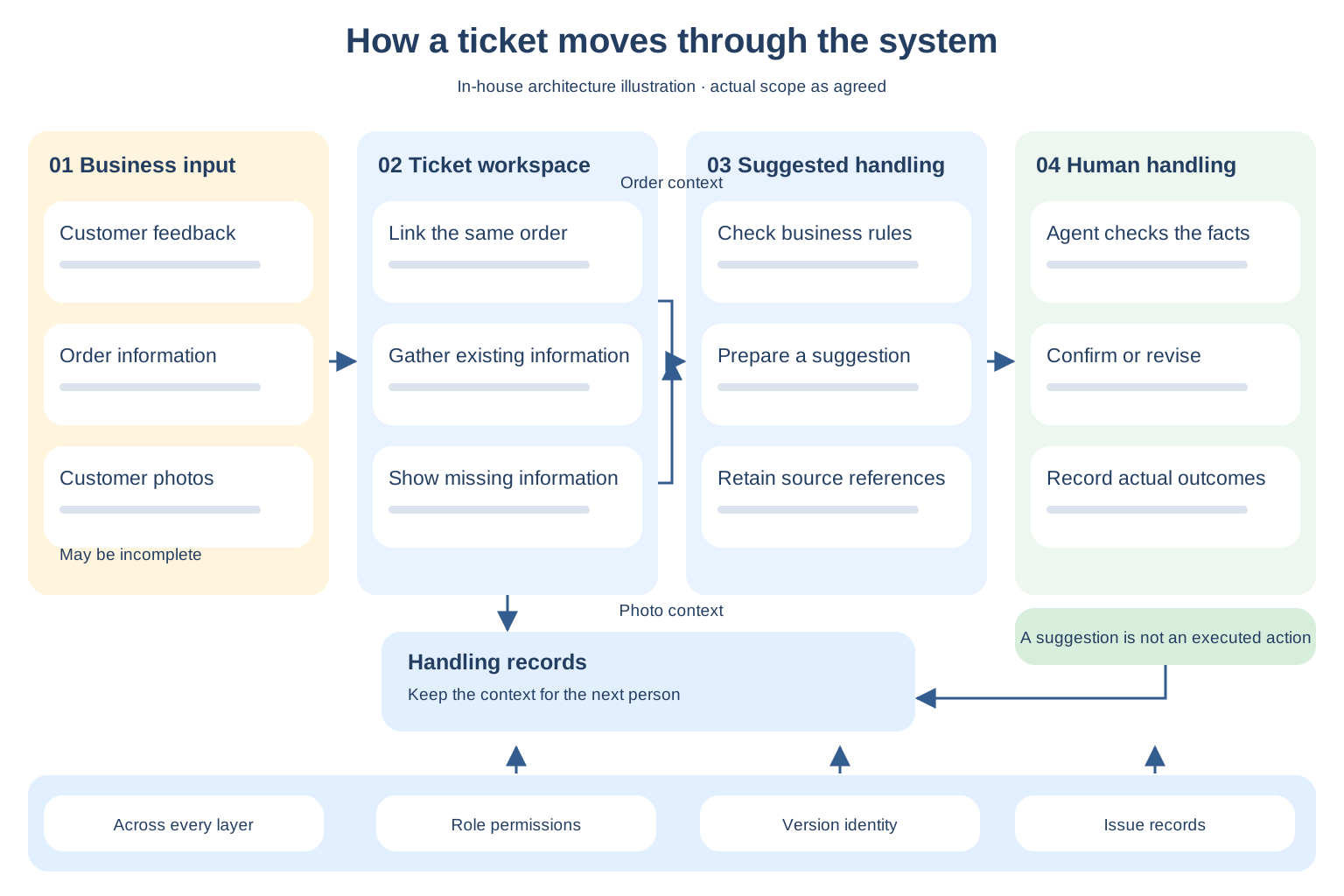
In-house architecture illustration

Where do tickets, information, suggestions and actual handling sit?

Follow one ticket through the system: gather information, prepare a suggestion with supporting sources, then let the agent check it and carry out the business action.

View full-size diagram
Ticket architecture: feedback, orders and photos enter the workspace; information and rules support suggestions; the agent checks them before actual outcomes are recorded. Permissions, versions and issue records span the layers.
  • Keep missing information visible when the material is incomplete, rather than hiding the gap inside a complete-looking suggestion.
  • Separate suggestions from executed actions. Record outcomes after human verification; a draft is not evidence that the work has been completed.
  • The next person follows the same order to find its history. Role permissions and the corresponding version are checked along that same task.

Illustrates this section’s components and relationships. Actual scope, connections and executable operations are confirmed per project.

Illustration of an agent checking customer feedback and order information at a workspace
The person doing the workInformation is brought together; judgement remains with the agent.
Ticket workspaceIn-house interface illustration
01 · Receive customer feedback

Order 01 · missing-item enquiry

“One of the cups was missing from the delivery.”
02 · Bring together the information needed to judge

Related orderInsulated cup · 2 items

Customer photosNot yet supplied

03 · Show the suggestion’s sources and missing information
First check the order and packing list

The available information is not enough to judge the missing-item situation. Missing material is shown alongside the sources to check, so the agent can continue verifying the facts.

Awaiting agent verification · no replacement has been initiated

The agent confirms, revises or returns the suggestion. The actual reply and handling records stay with the same ticket for the next person to review.

This illustration shows how a delivered system supports one task. The actual functions, connected material and human checks follow the scope agreed for the phase.

06Deliverables

What does the client receive besides the system?

After receiving several ZIP files, the people taking over still need to know what each contains and which one matches the running system. If three files all look like the latest version when they need to change a setting, they still have to ask the original developers. For the deliverables agreed beyond the system itself, we explain each item's purpose, location and version, and have the recipient find the right one during handover. Items on the agreed list that have not yet been delivered remain clearly marked, so that as more files arrive, it does not become harder to see what is still missing.

In-house stage delivery package · Order lookup illustration

A stage submission hands over one connected set of materials.

When a new version arrives, the client should also be able to find what to try this time, where the previous issue was changed, and what remains unconfirmed. Below, these materials are brought together around the same order lookup submission.

All these materials refer toOrder lookup · Trial version B

Planned check: a support agent opens order 01 with their role account to see whether the original blank display has been corrected.

Changes submitted, awaiting business recheck
  1. 01
    This system version and trial access

    The access point, environment and running version all correspond to B, and the recipient knows which role account to use. Start with order lookup. Suggestions that have not yet been connected are excluded from this round’s full handling check.

    Purpose: identify what can be checked in this submission.
  2. 02
    Submission notes accompanying the version

    State that order display handling was adjusted and that support staff are being asked to repeat the original operation. Keep results that cannot yet be confirmed in the notes.

    Purpose: explain why this version is being submitted and which step to inspect.
  3. 03
    The original issue record

    Issue 01: opening order 01 with a support account shows a blank screen. Keep the original behavior and version B’s changes in the same record, with the status still awaiting recheck.

    Explore how this issue is recorded ↗
  4. 04
    Feedback from the actual check

    After support staff repeat the original operation, record the version checked, the person, the time and what actually happened. There is no business recheck result yet, so submitted must not be recorded as passed.

    Purpose: attach the observed result to this submission.
  5. 05
    Operating and handover materials for this stage

    Let trial users find the order lookup instructions, account permission requirements and the role to contact about issues. List source code, deployment and maintenance materials against their separately agreed handover points; submitting a trial version does not mean the entire handover is complete.

    Purpose: show how to start the trial after receiving the version and how to report anything that blocks progress.
How do these materials lead to the next step?

Recheck the same order on B using the same role account, and attach the actual feedback to issue 01. If it is still blank, retain the failed result. If it opens, confirm only that step; suggestions and other untried content remain on their respective unconfirmed lists.

See how the same deliverables support a stage payment ↗

This is an in-house illustration of how materials relate, with no real project access or actual check results provided. What accompanies each submission, who receives each item and when it is handed over are confirmed against this phase’s scope and milestones.

Building the project deliverables list

Confirm the usable system and what is needed to take it over together.

These are the types of deliverables to confirm individually. Which are included in this phase, and how far each will be delivered, are specified when the scope and quotation are agreed. Inclusion of every item is not assumed.

Usable system

Identify the functions in this phase, user roles, submitted version and known limitations.

See how the system supports the work ↗
Runtime environment and configuration

Confirm where it is deployed, who manages it, and the configuration and dependency information needed for handover.

See what is needed for launch ↗
Source code or runnable artifacts

Providing access, delivering runnable artifacts and handing over source code are different arrangements. Specify each separately in the quotation.

See usage and handover rights ↗
Accounts and agreed permissions

Specify the receiving role, who controls the accounts, and what the client can operate and administer.

See how recipients access deliverables ↗
Usage, maintenance and training materials

Help business staff continue their work and maintenance staff find the instructions needed for deployment and troubleshooting.

See how materials relate to the work ↗
Review and handover records

Distinguish submitted, checked, awaiting fixes and awaiting receipt, and keep unfinished items visible.

See how issues and rechecks are recorded ↗

The actual list also needs each item’s version, location, recipient and current status. Receiving an access link does not mean receiving source code or all administrative permissions.

Handover illustration

Files sent across need to become things the recipient can actually find.

Ask the person taking over to open one item: they should be able to find the running version and the instructions needed for their next step.

Code or runnable artifacts

Open the agreed repository or artifact location and check that its version corresponds to the running system.

Configuration and dependency information

Find the configuration notes and dependency list, and locate where a parameter is set and who manages it.

Test and issue records

Find items that have not passed, along with their impact and current handling status.

Usage and maintenance notes

Find the steps for a routine task or a starting point for troubleshooting relevant to the recipient’s role.

The recipient confirms each item’s location and access conditions. Anything that cannot be opened or lacks instructions is recorded at the time for follow-up. Usage and handover rights for code, models and third-party assets follow the project agreement.

07Delivery format and specifications

Which version is actually being delivered?

Before discussing whether the system works well, establish that everyone is opening the same version. For example, last week's trial link may still be bookmarked while developers have submitted a new version this week. Without an explanation, business staff may reopen the old address and see issues that do not match what the developers just changed. Both sides are describing what they really saw, but the discussion does not connect. Whenever we hand over a system, we also explain which submission it is, which role should check which step this time, and where the previous issues were changed. Subsequent feedback can then refer to this version: first establish which one is being examined, then discuss how well it works.

Previous demoA

Keep the check record from that time.
It cannot stand in for today’s deliverables.

This checkB

Today’s access point and artifacts are both labeled B, so everyone continues with the same version.

Current version under review

Return to the previous restricted-document query

Permission handling has been adjusted, but the original account and question must still be checked again on B. Changes submitted and check passed are reported separately.

In-house version notes · Excerpt

Policy lookup / Submission B

Awaiting recheck of the original scenario
Corresponding deliverables
This trial access point and runnable artifacts are both labeled B. Their receiving locations are listed in the submission notes.
Who should check this time?
Business trial users repeat the restricted-document question with the original standard employee account.
Where was the previous issue changed?
Permission handling for query results has been adjusted. This records submitted changes; a passed check has not yet been recorded.
Still unconfirmed in this submission
Whether restricted sources still appear awaits recheck using the original account and document conditions.

Formal submission notes use the actual version identifier, access location and reviewers. This in-house excerpt does not provide a project access point.

A and B are in-house illustration labels. Data not yet connected and scenarios awaiting checks are also explained. Formal acceptance uses the version designated by both parties and its corresponding records.

08Delivery format and specifications

Where are the deliverables kept, and how does the client receive them?

Where a file is stored and whether the recipient can open it need to be checked together at handover. If a link works on a developer's computer but denies access when a maintenance colleague uses their own account, that material cannot yet support the work that follows. Once the original contact is no longer in the group, finding someone to grant access can hold up even a small change. During handover, we check the system environment, file locations and required permissions with the recipient, and ask the person taking over to open them with their own account. We check whether the needed content is there and whether they can continue operating as agreed.

Receiving locations illustrated

Use the recipient’s own account to take over the deliverables.

System recipient

Enter the agreed runtime environment

Enter with the account designated by the client and check the agreed administrative permissions.

Technical recipient

Open the repository or artifact location

Obtain the agreed content and know who will manage access permissions afterward.

Materials custodian

Open instructions and handover records

Open them with the recipient’s own account and the agreed software, with a designated role responsible for keeping them.

If someone else takes over later, will the original developers have to unlock access again? During handover, the client’s permission administrator can grant access to another recipient as agreed and verify this step in person.

Locations, formats, languages, accounts and permission scope are confirmed for each project. This illustrates the receiving relationships; it does not mean every project includes full administrative access.

09Delivery timing and milestones

When can business staff first try it themselves?

If business staff only get to operate the system shortly before launch, the step that actually blocks their work may be discovered too late. The pages may look complete, yet a real task lacks necessary information, or the result is still insufficient to make a judgment. By then, development has already moved on and the planned start date is getting closer. The first hands-on version needs to arrive while there is still time to adjust these areas. We first deliver an operable part of this phase's most important task and ask the actual users to do it themselves and point out which step remains uncertain. That tells subsequent development whether to connect missing information, add rules or change the original approach first.

Before broader integration and formal launchFirst make a hands-on version of the key workflow. Who tries it, which task they try and the specific delivery date are scheduled in the kickoff plan according to scope and dependencies.
10Delivery timing and milestones

What can be checked at each upcoming milestone?

“Trial operation starts next week” needs more explanation. In support, will staff only be able to open a ticket by that date, or will they also see the order and use the information to continue handling it? “Development is 80% complete” hardly answers that question. The same percentage could mean the pages are all there, or that the most important information is still not connected. For each subsequent date, we explain which version will be submitted and which step each role can actually perform, alongside the parts still not connected. Following the same task through these milestones gives the project lead a basis for arranging trials, and tells business staff exactly what they can check this time.

In-house schedule illustration · Follow one support ticket through the deliverables; actual dates follow the project plan

  1. Connect
    When the agreed environment and accounts are connected

    Agents see the agreed order and customer information

    A user opens a ticket with their own account and checks whether the information needed to handle it has arrived as agreed.

  2. Try
    When trial operation begins

    Agents handle the task themselves and record the result

    Within the confirmed trial scope, check whether a ticket can be handled through to the end and where manual support is still needed.

  3. Open access
    Before deciding to open formal access

    Clarify who can use this version

    Review unresolved issues and affected roles, and confirm the scope of work that can be opened this time.

  4. Hand over
    At acceptance and receipt of deliverables

    Recipients obtain this phase’s version and materials

    Check the current version, its review records and agreed handover items, and identify what has not yet been received.

In-house plan item · Illustrating how a schedule is written

The first business trial needs this level of detail in the plan.

The kickoff plan confirms submission dates based on this phase’s scope, existing systems and when each party can provide prerequisites. For milestones that cannot yet be dated, explain what is still awaited and agree when to check again.

What will be submittedA version where agents can look up the related order themselves

Try opening the order and checking whether the information is enough to make a judgment. If handling suggestions are not connected yet, do not schedule acceptance of the full handling process.

What does this date depend on?Test environment, role permissions and order lookup prerequisites

Materials and permissions can be prepared alongside page development. Integration testing of actual order lookup waits until those prerequisites are ready.

When is the date confirmed?Confirm in the kickoff plan and review when conditions change

Include when the provider expects to be ready, when readiness will be verified and who follows up. Unconfirmed dates remain pending.

This item shows the information a plan needs; it does not mean an actual project has been scheduled. The specific plan lists each submission date, owner and prerequisite, and trials are arranged after both parties confirm it.

The actual schedule lists each date together with its deliverables and prerequisites. If environments, accounts or materials are not ready, we identify which checkpoint is affected so the project lead can coordinate.

Part 2 / 11—20

Then, judge what counts as a sound delivery

Acceptance uses actual users and agreed scenarios. Responsibilities, decisions and bad news also need someone to take them forward.
11Acceptance criteria

What counts as completing this phase?

Every function on the list may open, yet actual work can still stop at a step. Staff may find a policy passage but not know whether it is currently applicable, or get a suggestion without being able to tell whether its evidence is sufficient. These details affect whether they can make the next judgment. Acceptance criteria need to reach this level. Before work starts, we agree with the client what counts as completing this phase's task and what results and evidence users need to see. At review, we perform the same task and identify which steps have been achieved and which have not. Decisions then need not rely solely on “all the functions are there” or “it feels hard to use.”

In-house acceptance illustration · Missing-item ticket

Is this suggestion based on the order being handled?

Question received by support · Order 01
“One item is missing from my delivery. What should I do?”
Handling suggestion

First check the order linked to this ticket and its item list, then identify which item is missing.

Photo not provided · Awaiting information

The order linked to this ticket

The item and order information used by the suggestion can be checked here, one by one.

  • Linked order: Order 01
  • Reference materials: item details and packing list
  • Still needed: customer photo, not provided
Ticket → Linked order → Basis for the suggestion

A fluent reply is still insufficient if the order evidence for this ticket cannot be found.

Mark missing information as awaiting input, and do not present guesses as confirmed facts. Both parties agree pass conditions, quantitative indicators and review evidence in advance.

Existing in-house demo · Open it and check

Look at the output: does the answer have a basis, and what happens when information is insufficient?

In the policy Q&A demo, questions, answers and cited clauses can all be expanded. The two examples below come directly from that sample, so the same questions can be checked in the demo.

When a clause provides a basis
Can employees upload documents containing customer information to unapproved public models?

They must not upload them directly. Documents containing customer names, contact details, contracts or business data may only be processed in a company-approved environment.

Data Handling Policy · Clause 2.1
Documents containing customer information must not be sent to unapproved external services. If model processing is necessary, use an approved environment and register the purpose.
Document version v2.1 · Applies to: Documents containing customer information

Check this: can the judgment in the answer be traced to the cited clause and its applicable scope?

When the documents do not specify a rule
How many years must customer records be kept in the system?

The existing policies do not specify a uniform retention period.

Who continues the check?

Data owner / Legal team

Tell the data owner or legal team the document type, applicable regions and business purpose.

Check this: with no basis for a number of years, the page does not invent one. It keeps the outstanding question and responsible role visible.

Open the demo and choose a question

Independently constructed policy documents and questions, not client data; The browser presents Q&A results through reproducible preset steps; this page does not call a real model. The display of answer sources, insufficient information and human follow-up can be checked. Results with real documents, permission isolation and production operation still require project validation.

12Acceptance criteria

Which questions, data and accounts will be used for the trial?

Completing a ticket with all its information is not enough to show how the other situations in an agent's daily work should be handled. For example, when a customer only says “something is missing,” there may be no order number or photo yet. What the agent should ask next, and which judgments cannot yet be made, are precisely what needs checking. When preparing acceptance materials, we select familiar questions like these with the actual users and include the missing information agreed for coverage. With the same role account handling an incomplete ticket, operations reveal what the system can point out and where more information is needed, rather than checking only the few cases with every answer already prepared.

In-house sample illustration · Two missing-item tickets
The case with complete informationOrder, item details and photos are all provided

Check whether the suggestion uses the right evidence.

The case that also arrives in everyday workThe customer only says something is missing and has not provided a photoPhoto awaited

Check whether the system identifies what is missing instead of guessing a handling conclusion.

First ask actual users for frequent tasks that most easily get stuck, then jointly agree the materials, accounts and expected results for checking. Sample coverage is confirmed for each project.

13Acceptance process

On acceptance day, who tries it and who signs off?

The person who signs off may not operate the system every day. A single demo cannot easily show whether business staff can continue handling work back at their desks, or confirm on behalf of maintenance colleagues that environments and accounts are ready. Before acceptance, these different judgments need their own sources: everyday users perform the agreed task themselves, the business lead checks whether the result meets this phase's requirements, and technical colleagues check deployment and handover prerequisites. We put the submission and actual review feedback together so the final approver can see who checked which step and what remains unconfirmed. Sign-off then has concrete details to assess.

Acceptance roles illustrated · People confirmed per project

Actual users

Perform an everyday task themselves and record where they cannot proceed or still need support.

“I still cannot get past this step.”

Business lead

Judge whether the results can support the business work agreed for this phase and identify unmet requirements.

“Which business task will this affect?”

Technical reviewer

Check the reviewed version, environment and agreed technical conditions, and explain relevant limitations.

“Which version are we checking?”
Final approver

Review each party’s records before deciding to accept.

Decide whether to accept based on actual check records and both parties’ agreement. Include the user’s record of being unable to proceed, rather than showing only a summary of passed checks.

Assign these roles to specific people before acceptance. We submit the version and review records; the client makes business judgments and the acceptance decision as agreed.

14Acceptance process

How are failed checks revisited?

After a check fails and developers submit a change, the actual result still needs to be checked at the original blocked step. Use the same account, original operation and documents from that time, and repeat it on the corrected version to learn whether the work can continue. Demonstrating an easier question instead may make the screen look smooth without resolving the previous failure. We retain the original check conditions and attach what actually happened after the fix to that issue. Anything still failing remains visible and can be found at the next check, rather than disappearing from discussion when a new version is delivered.

In-house retest illustration · A permission issue
The step that originally failed

The restricted source still appears after rephrasing the question.

A standard employee saw a policy source that should not have been accessible. Keep this failed result.

Try the corrected version here again

Return to the same scenario with the original account and question.

Keep the same document scope and check permission conditions. Explain any changed conditions separately.

Record what actually happened this time.

Record the version, answer and source results, and check whether restricted content is blocked as agreed. The actual result determines whether it passes.

Retests are performed by the relevant people confirmed for the project. Actual results and the agreement determine which fixes continue and which unfinished items remain.

15Responsibilities of both parties

What are we responsible for in this delivery?

With ticket lookup, when an order cannot be seen, users can explain which step stops their work, but cannot easily tell whether the problem is in the page, backend or API. If troubleshooting only starts after the right technical owner is found, the project lead has to pass screenshots between several parties and explain the same business task repeatedly. When a problem arises in the part we agreed to deliver, we first reproduce the actual operation and check where the order query was sent and what came back. If the API provider needs to help, we bring the facts already found, giving coordination a concrete basis. The client does not have to learn the technical division of responsibilities before reporting an issue.

In-house troubleshooting illustration · A ticket cannot retrieve its order
“The ticket opens, but the order information is blank.”

The project lead describes which business step cannot continue. We first reproduce that ticket and check its linked order, request and actual response.

We first take the issue and investigate where work is blocked.

Within the part we deliver

Arrange fixes within the agreed scope, return to the original ticket for checking, and give the result to the project lead to review.

When the API provider needs to investigate further

Organize the request, response and outstanding questions, coordinate with the API provider under the agreed responsibilities, and report progress back.

How a progress update can read · In-house illustration

“This ticket has sent a query, but the response contains no order information. We are checking the response conditions with the API provider. After their confirmation, we will check again and tell the project lead when the next update will be.”

Development, deployment, fixes and outside investigation responsibilities are confirmed in the project. Changes to third-party systems are their owners’ responsibility.

16Responsibilities of both parties

Where is cooperation needed from the client and third parties?

Asking the client to “create an account” also requires explaining its purpose clearly enough for internal colleagues to act: which role will use it, which business records they need, which environment they will try, and who must approve that access. If only the account is created and missing permissions are mentioned at integration testing, the client has to approach the same people again and explain why the requirements were not clear the first time. When requesting cooperation, we put these conditions alongside the operation they need to support. After the account is ready, we test its agreed use and identify the specific authorization or information still missing, so the next coordination has a clear subject.

In-house cooperation illustration · An agent looks up an order

Make this step specific before the project lead first asks others for help.

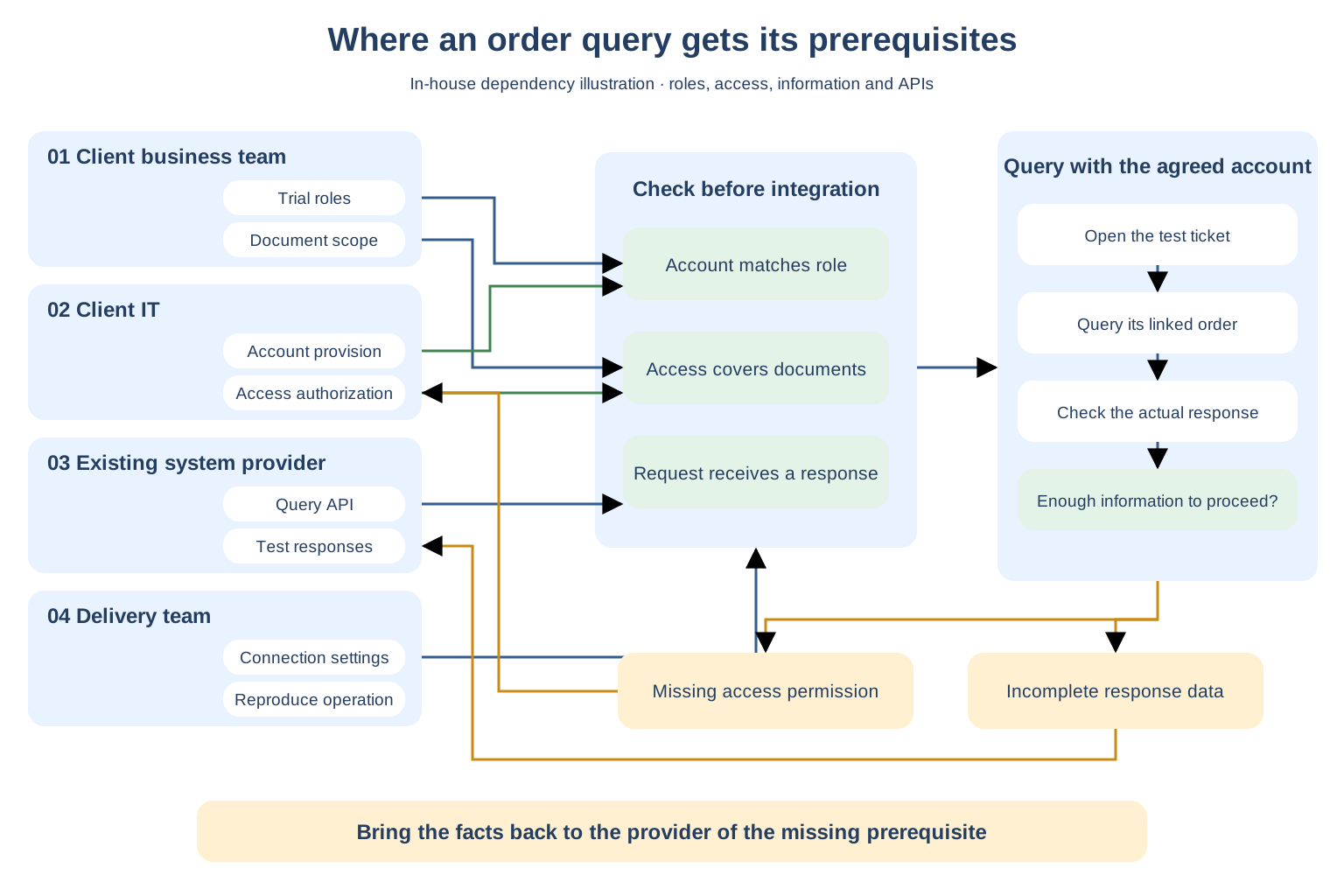
In-house architecture illustration

How do roles, authorization and APIs come together before integration testing?

Four parties provide different prerequisites, checked against the same ticket. Having an account and having access authorization are two separate conditions to verify.

View full-size diagram
Integration dependencies: the client's business team confirms trial roles and document scope; client IT provides accounts and access authorization; the existing system provider supplies APIs and test responses. The delivery team checks these and queries with the agreed account. Missing permissions return to client IT; missing response data returns to the existing system provider.
  • The client first confirms business roles and document scope, then maps these to accounts and access authorization.
  • The existence of an API is not enough. Check what the test request actually returns.
  • Missing access permissions go to the authorization provider; incomplete response data goes to the existing system provider. The delivery team continues integration checks with the facts already found.

Illustrates this section’s components and relationships. Actual scope, connections and executable operations are confirmed per project.

For the client to confirm

Which agent can view which orders?

Confirm trial users, order information scope and internal approvals. An authorized role enables the agreed access.

Needed from the existing system provider

How is the order linked to this ticket retrieved?

Provide the agreed query method, test environment and test responses, and identify the API coordination contact.

We perform this integration check: use the agreed support account to query a test ticket and verify that the corresponding order is retrieved. We identify the missing permission or response data, then ask the relevant person to supply it. The project lead confirms business authorization.

Map materials, accounts, environments and feedback to planned milestones. Specify providers, dates and affected deliverables in the project.

17Project organization and roles

Who should the project lead contact first when something happens?

When a trial is already scheduled but the account cannot get in, whoever takes the issue needs to know both the login behavior and the arrangements. Passing only “there is an account problem” to development leaves the next colleague asking again which environment, who will use it and what is being checked today, while the trial users keep waiting. At kickoff, a first point of contact is confirmed to receive the blocked business step and help fill in necessary information. If technical colleagues need to investigate together, that context follows the same issue, and someone continues explaining progress. The project lead need not explain why it is urgent again every time the contact changes.

In-house communication illustration · The same trial issue

When an issue changes hands, its context needs to follow.

The project lead reports during discussion
“The support trial account returns to the login page after signing in. The people scheduled to try it today still cannot get in.”

This time, the project lead needs to get the trial moving.

The project contact takes the issue first

“I’ll check this trial’s situation first and ask technical colleagues to investigate this account issue with me.”

Pass this issue on with its context

Known: agents return to the login page after signing in, blocking today’s scheduled trial.

Still to check: the specific account and login address. The project contact helps add them to the same record.

Technical colleagues

Check the account and environment against this record, while the project contact continues following up on the trial issue.

The project lead first explains the business step that is blocked. Internal handoffs continue along the same issue.

Before the trial, the lead can confirm this point

“After this issue goes to technical colleagues, will the project contact still explain progress?”

The actual contact, contact details and scope of responsibility are confirmed in the project. This shows a communication method, not a staff roster or promised response time.

18Project organization and roles

Who decides when views differ?

“The system helps support handle cases” can mean offering a suggestion for an agent to confirm, or having the system execute the next action directly. Both sound like progress, but they require different staffing and business arrangements. Unless that step is explained during discussion, people may leave the meeting and prepare according to different interpretations. When this happens, we describe this phase's actual operations and the parts still requiring people within the same concrete task, and ask the lead authorized to decide business and staffing arrangements to confirm. Anything unconfirmed remains awaiting a decision, giving later scheduling and trials a clear basis rather than treating silence in a meeting as agreement.

In-house discussion illustration · Handling a missing-item ticket

Expectations and this phase’s capabilities differ over who confirms a replacement shipment.

  1. Business colleagues
    “We want the system to start a replacement shipment once it identifies a missing item, so agents need not check every case.”
  2. Delivery team
    “This phase can gather the order and existing information and offer a handling suggestion. Agents still confirm whether to send a replacement.”
Expand the steps this phase can actually perform
  1. The system gathers the order and information
  2. The system offers a handling suggestion
  3. An agent confirms whether to send a replacementA person still needs to be assigned to this step
Awaiting client confirmation

Agents still confirm replacement shipments this phase. Is that arrangement acceptable?

The client’s lead authorized to decide this support work arrangement confirms it. The delivery team first explains actual capabilities clearly. Anything unconfirmed at the end of discussion stays unconfirmed, so the project lead need not infer agreement from a lack of objections when arranging staff afterward.

The decision-maker and their authority are established in the project. This is a discussion illustration, not an approved scope, an actual client decision or a universal approval process.

19Communication and progress reporting

How does the project lead know where the project stands day to day?

To arrange when business staff should try the system, the project lead needs to know which step actually works now. “Progress is going well” does not explain whether the page opens, order information is connected, or agents have enough information to continue handling a case. Each state calls for a different trial, so a general progress statement is not enough to schedule people. In stage reports, we bring out the current version along the same task in this phase, explain the parts already operable and keep the next unconnected step visible. If orders can be viewed but handling suggestions are not available, first inspect the part that really works, then check what has been connected next time. Internal updates also have something concrete to show colleagues.

In-house progress illustration · The same missing-item ticket

Orders are viewable; full handling is not ready for trial.

What can be viewed in the current version
Missing-item ticket · Order 01
The customer reports receiving one item too few

Order 01 records two insulated tumblers.

Open this order with the trial account, view the information and compare it with the customer’s description.

Order information is viewable
Handling suggestions are not yet connected

This step is still in development. Agents cannot try the full handling process in this submission.

How to explain this progress internally
“This version can look up this order and show its items and quantities. Suggestions have not been delivered yet, so agents cannot try full handling for now.”
Next check

Open the same missing-item ticket again and see whether it can offer a handling suggestion based on the order and customer’s description, giving the agent something to judge.

Look at actual output; keep undelivered parts marked.

This illustrates how to describe stage progress, not the status of an actual project. Specific deliverables, viewing methods and report timing are confirmed per project.

20Communication and progress reporting

When does the project lead hear bad news?

Once a trial is agreed internally, business colleagues reserve time and the lead schedules subsequent work around that date. If a prerequisite is not ready, even when the length of a delay is uncertain, its possible impact on the next step needs to be explained first. The nearer the planned date when the issue is raised, the less room remains to adjust invitations, staff and that day's work. We report known facts separately from unconfirmed dates. For example, if order information is still disconnected and whether the trial can proceed needs checking, we make that status clear first. Internal teams then have time to decide their arrangements, without waiting for a reassuring answer before being told.

In-house scheduling illustration · A trial already agreed internally

Tell the project lead while the arrangements can still change.

01 · The API still cannot retrieve the informationTell the project lead at this point

Order information is not connected. Whether the planned trial can proceed is currently unconfirmed.

02 · The lead can still adjust internal arrangementsKeep time available for coordination

Hold off on inviting more people and confirm whether this trial needs rescheduling.

03 · The agreed trial milestoneBusiness colleagues are ready to try it

Do not wait until colleagues arrive to tell them it cannot be tried yet.

This explains when to communicate. Actual milestones and notification methods are agreed per project; not every issue is promised to be resolved on the original schedule.

Part 3 / 21—30

Confirm that it can enter actual work

From quality checks to data, training and documentation, examine whether the system works beyond the demo environment.
21Quality assurance

What do we check before business staff try it?

Time set aside for business staff to try the system should help them judge whether work can proceed. Login, access to the information their role needs, and blocking information they must not see need to be checked first as agreed. For order lookup, checking that their own orders are visible does not show what happens with another department's order. We test this using the account intended for the actual role. If access goes beyond the confirmed scope, we correct that version first and repeat the check under the same conditions. User trials are meant to expose real work blockers; obvious basic issues need to be checked by the delivery team beforehand.

In-house check illustration · Before trial submission

Check access to their own orders and attempt access to others’ information too.

Support trial account

Check with the account this role will actually receive.

Own department’s ordersShould be viewable

Confirm that information needed for work can be opened.

Other departments’ ordersShould be blocked

Do not test only the successful path.

If these orders still open, do not submit this version for the business trial yet. Correct it and check again with the same role account.

The client confirms document access scope. This diagram shows what to check; it does not mean a real system has passed or that checks eliminate every risk.

22Quality assurance

What record is kept when an issue is found?

When the same issue returns, the hardest part may be reconstructing its history: which account and version were used, exactly where work stopped, and whether users were asked to retry the submitted fix. In chat alone, this information spreads across days of messages. People remember hearing that it was fixed but may not be able to point to the check that confirmed it. We give each issue a location that remains easy to find, linking the original behavior, later changes and actual rechecks. If developers have submitted changes but users have not checked them, the status remains awaiting recheck. Discussion can continue from last time without anyone having to prove again that the issue was raised before.

In-house issue record · Ticket opening failure

Record changed and tried by business users separately.

Issue 01
A support account opens the order but sees a blank screen
  1. When reported

    Trial version A · Support account · No content after opening order 01.

  2. After the change

    The delivery team submits trial version B and records this change.

  3. Awaiting retest · Pass not confirmed

    Business colleagues still need to retry with the original account and order.

    If it is still blank, attach the new result to this issue rather than making the project lead search old messages to prove it was reported.

Who continues following this record?The project contact follows up; technical staff check the change

Name the specific people in the actual record. Do not let the issue stop at forwarded to development.

What result is needed next?Business trial users repeat the original operation on B

Record the check time, whether it is still blank and necessary observations. Until retested, keep it unconfirmed.

Issue numbers and versions belong to this in-house illustration. Real records retain actual behavior and check results; submitting a fix is not equivalent to passing.

23Launch, deployment and cutover

What must be ready before launch?

A demo account entering the system still leaves the question of whether business staff can reach the same step in their own workplace. For the department receiving access, use the account its staff will actually receive, open the target environment from their everyday work network and check whether the information they need is visible. A different account, network or environment may invalidate the conditions that made the demo run smoothly. Before launch, we check these actual usage conditions as agreed and identify the missing permission, access point or information. Starting use then rests on conditions that genuinely allow work to begin, rather than on having seen one smooth demo.

In-house launch preparation illustration · From the demo to the office

First sign in with the account business staff will really receive.

During the demo

Account prepared by the delivery team

Can enter the demo environment
Access to check before formal opening

Agent’s own account · Everyday office network

Can it enter the target environment?Ask the agent to open order 01 in the target environment.

If access is denied, list the missing order permission and the person who can authorize it, then confirm whether access can be opened.

Target environments, user roles and permissions are confirmed per project. This does not mean any environment is already ready.

24Launch, deployment and cutover

If cutover goes wrong, which business operations need protection first?

One situation needing particular care after cutover is a page still showing processing while no one knows whether the business action has occurred. With a replacement shipment, if the record does not update, another click may submit the same shipment twice. Investigating only why the system is slow may leave business staff continuing actions while they wait. Before cutover, we explain for the specific project which operations with uncertain outcomes must pause, retaining orders and handling records to check what has already happened. Temporarily returning to the original process also requires checking that it will not duplicate actions from the new version. While investigating the technical cause, we keep these uncertain business operations from being processed twice.

In-house cutover illustration · A replacement result has not returned

If success is still unknown, do not submit it again yet.

Order 01 · Replacement outcome unknownProcessing…

This alone proves neither failure nor success.

Before arranging a replacement in the old system, check whether it has already been executed. Do not perform it once in each access point.

Stop repeat submissions first

Keep these operations with unknown outcomes recorded and stop further replacement clicks.

Check actions already taken

Check the original system and handling records to confirm whether a replacement was initiated.

Agree pause scope and recovery methods beforehand for the actual system. Restoring an old version cannot be assumed to undo business actions already taken.

25Data migration and initialization

Which old data needs to come across?

To decide which old data to bring across, start with an unfinished task and work backward. An agent continuing an order needs to know what was promised to the customer, whether a replacement has already been sent and which conversation is awaiting a reply. Moving only the order number and item information may still force that work back into the old system. We identify with business staff the history needed to continue this phase's work, bringing related notes and actions already taken into the migration scope discussion. For records temporarily left behind, we explain where they can be found afterward, so unfinished work retains its context after the access point changes.

In-house migration illustration · An order still being handled

The order has moved; earlier promises to the customer must also be findable.

Unfinished order 01

Support still needs to continue handling it.

Confirm individually whether these related records belong in this phase.
  • Order contentsCustomer and item information
  • Handling historyNote promising a replacement shipment
  • Actions already takenWhether a replacement has already been initiated
Records temporarily left in the old system

Whether completed historical orders are migrated depends on this phase’s actual lookup needs. For records not brought across yet, explain the old lookup access point, who can still access it and how long it remains available.

Data scope, relationships and how long old access remains available must be confirmed per project. This is not a universal migration checklist.

26Data migration and initialization

How do we know migrated data is correct?

Matching counts in the migration report still leave the question of whether active records retain their business meaning. An order marked replacement sent in the old system may show awaiting replacement in the new one. No record is missing, but the action an agent takes next could be entirely different. After migration, we return to the same record with business staff familiar with this work and compare its old status, new status and related notes, checking whether differences change the next operation. The absence of a program error cannot by itself confirm that the information is correct. The actual role needs to check that continuing work from these records still means handling the same original matter.

In-house comparison illustration · Order 01 in both systems

No record is missing, but whether to send a replacement has changed.

Handling status in the old system
Replacement sent

A replacement record already exists; it should not be initiated again.

Status seen after migration
Awaiting replacement

An agent may initiate another replacement based on this.

Check this inconsistent status alongside the executed replacement record, and have business staff confirm the true state. Neither old and new labels alone nor a successful migration job is enough to continue processing under the new status.

This status difference is an in-house illustration. Business staff and both project parties confirm actual spot-check samples and conditions for use.

27Training and knowledge transfer

Can everyday users get started on their own?

Listening to someone explain menus and handling a task with the mouse oneself reveal different difficulties. An agent may know where the suggestion button is but be unsure whether to continue when a ticket lacks a photo. If training only covers the smooth workflow, the step requiring real judgment still needs someone familiar with the system to help. We leave time for hands-on work in training, asking users to work with everyday materials and explain which step is uncertain and why they stopped. At that step, we explain what must be supplied first and which actions cannot yet be taken. When a similar task arrives, users know where to continue, rather than only remembering a demo.

In-house training illustration · An agent operates a ticket independently

Let users reach the uncertain step, then listen to their question.

Operator: support agent
The customer reports a missing item; the photo has not arrived.

The agent opens the ticket and available information themselves.

“There is no photo here. Can I send a replacement directly based on the suggestion?”

Let this question arise during practice, rather than the next time they take a call alone.

Practice at the blocked step

Find the actual rule for missing photos together, then have the agent explain what needs to be added first and what to do next. The trainer should not click past it for them.

Training tasks and business rules are confirmed per project. Handling without photos follows the actual rules; no universal replacement decision is provided here.

28Training and knowledge transfer

Can the future system administrator take over independently?

Before changing a configuration, the maintenance recipient needs to identify the running version and find its corresponding instructions. If a folder contains several deployment documents and the original developers still have to say which one is right, administration remains dependent on the original team. The materials appear complete, but hands-on work still requires asking someone. Before handover, we ask the recipient to start from the current running environment, find the matching version and configuration location themselves, and perform an agreed administrative operation. Wherever verbal directions are still needed, we clarify the instructions, giving later maintenance something independently recognizable rather than discovering after staff change that handover stopped at receiving files.

In-house handover illustration · The recipient finds it independently

Start with the running version and find the instructions that belong to it.

  1. The recipient first checksCurrent running version

    Identify which version is serving the business now.

  2. Follow the version to findMatching deployment and configuration instructions

    Check whether the files match the current environment.

  3. Follow the instructions to performThe agreed administrative operation

    In the exercise environment, locate the current configuration and check an agreed setting, without relying on verbal directions from developers.

    Add any location that cannot be found to this version’s instructions.

The exercise environment, permissions and operations follow the project agreement. Avoid arbitrary changes to live business operations.

29Documentation deliverables

What instructions do users have at hand?

After pressing a button, someone using the system for the first time still needs to know what the result means. With support tickets, can a generated suggestion be sent straight to the customer? Has a replacement shipment already started? Where should they stop if information is insufficient? A screenshot alone cannot answer these questions. Usage instructions follow the actual task, explaining what appears at each step, the evidence to check and the decisions still left to people. Without a trainer beside them, users can consult the instructions to identify where they are, and know which rule to read or which role to ask when uncertain.

In-house usage instructions · Excerpt for a first-time ticket handler

Explain what users see after a click so they know which step they have reached.

Handle a missing-item ticket
After generating a suggestion, check it before making a business decision.

Open the order and information already provided by the customer. Check items, quantities and existing handling records.

What the user sees nowA handling suggestion awaiting the agent’s judgment

It does not mean a reply has been sent to the customer or a replacement shipment has started.

If information is still insufficient for judgment, keep it awaiting confirmation. Instructions should locate the relevant rule and identify the role to ask about such issues, then follow this project’s rules.

This illustrates how instructions are written, not an operating manual for a launched product. Specific steps and button names are confirmed with the delivered version.

30Documentation deliverables

What information can maintenance staff rely on?

After receiving materials, maintenance staff need a way to investigate an actual request. If an order query suddenly stops showing data, they first need to know which system supplies it, where the current configuration lives and where to find the latest request record. A list of technologies alone does not locate these places. Maintenance notes connect the agreed call flow, configuration locations and runtime records, explaining which facts to check first and which conditions require confirmation from the original system provider. When the recipient can describe whether the query was sent and what returned, collaboration can continue from concrete information rather than waiting for the original developer to come online and explain.

In-house maintenance notes · Where order information comes from

When an order cannot be found, know where to look first.

Order lookup in the system

The actual path used to retrieve information.

  • Information sourceQuery API of the original order system

    Identify the provider and API used in this phase.

  • Connection configurationConfiguration location for the current environment

    Locate where connection settings are managed. Credentials are kept under access controls, not scattered through the instructions.

  • Runtime recordsRecord left by this query

    Use order 01 and the time the issue occurred to find the same query and check whether the request was sent and what returned.

Actual configuration and record locations are handed over in project materials. The public page does not show keys, real accounts or client system addresses.

Part 4 / 31—40

Clarify ongoing support, risks and costs

These arrangements are confirmed when working together and continue through stage delivery and later use. Receipt and payment follow their respective agreed milestones.
31After-sales and operational support

Who takes issues found after acceptance?

Everyday use after acceptance may bring business staff documents and situations not tried before. Whoever takes such feedback needs to know which version was delivered, how far it was agreed to go and what existing records already checked. If support personnel change without carrying that context forward, every report begins by introducing the system again. At closeout, we confirm the agreed support channels and responsibilities and connect the delivery context, version and unfinished items to those arrangements. Later feedback can continue investigating the original work, and the basis for delivery remains findable after sign-off.

In-house support illustration · First feedback after sign-off

The support recipient can find the context of this delivery.

Project acceptedEveryday business use begins
Report through the agreed project support channel
“In the current version, order 01 opens but no suggestion appears. The agent is stuck at this step.”

The receiving role can also find the delivered version, original scope and existing issue records.

First check against the original version and agreed support coverage. If new work is involved, explain what needs a separate agreement.

Support channels, receiving roles, coverage and duration are confirmed per project. This does not mean every issue after sign-off is handled free of charge.

32After-sales and operational support

How is the system maintained after support ends?

As the system continues in use, resources need renewing at expiry and API version changes need someone to follow up. Acceptance does not automatically assign these tasks. Whether support for defects in the original delivery includes resource management and later API adjustments needs to be checked item by item. Waiting until service is about to stop leaves budgets and recipients to be found at short notice. Before support ends, we list the maintenance tasks already identifiable for the next period, explain who renews resources, who follows API changes, which tasks are covered and which need separate cost confirmation, leaving time to prepare continued use.

Ongoing maintenance arrangements · Duration confirmed per project

Support has an end date; continued use still needs someone to arrange maintenance.

Before original delivery support endsConfirm the next maintenance period first

What support covers, and what other ongoing maintenance involves.

Provide ongoing maintenance notes: who takes each of these two tasks, which charges are separate and who arranges work not included.
  • Keep cloud resources running

    Identify who manages and renews resources, matched to actual expiry dates in advance.

  • Changes to the original API

    Who follows the change, and whether modifications and new checks are needed.

Maintenance scope, service duration and charges are confirmed per project. No standard annual price or long-term free maintenance is claimed.

33SLA service levels

How are issues prioritized?

“Cannot find an order” can mean one agent can still use another access point, or an entire team has no orders to view. The impact is different. To decide what comes first, check where work has stopped, how many people can continue and whether a temporary workaround has been confirmed usable. If customer calls keep arriving while the whole team cannot query orders, message order in the group cannot be the only queue. Incorrect handling or unauthorized document access also needs separate explanation, even if only one account is affected. Feedback carrying these actual impacts lets the recipient prioritize by business conditions and gives follow-up something specific to reference.

In-house priority illustration · The same report of order lookup failure

First check whether business work can continue.

One agent’s page has a problem
A usable lookup access point remains

Confirm that the alternative really works and record the affected account.

Order lookup is unavailable to the whole team
Calls keep arriving, but no one can query orders

Work has stopped. Escalate as agreed and make the affected scope clear to the recipient.

Explain incorrect data or unauthorized access separately.

Even with one affected account, check first whether incorrect processing or information exposure is occurring. Do not prioritize by headcount alone.

Incident levels and handling order follow both parties’ agreement. This illustrates the basis for judgment, not fixed service levels.

34SLA service levels

Where are response and handling times specified?

When work has stopped, “received, we'll handle it as soon as possible” is not enough to plan what follows. When someone starts investigating, when the next clear update arrives and how to adjust if recovery is not yet possible all need explaining. Unresolved causes or third-party conditions may prevent an accurate recovery date, but what is known and what is still awaited should not go without updates. Service agreements separately specify response requirements, how progress is communicated during handling and how to escalate beyond agreed limits. Those waiting can check facts at the next update time rather than repeatedly asking “is it fixed?” to learn how far investigation has progressed.

Service timing agreement · Specific values recorded in the project

While waiting for recovery, the project lead also needs to know when the next update will arrive.

  1. Report receivedSubmit through the agreed channel

    Describe the business impact and observed behavior.

  2. First responseSomeone takes responsibility for the issue

    Confirm receipt and current handling arrangements within the agreed time.

  3. Handling underwaySpecify the next update

    Even before recovery, explain what has been found and what is still awaited.

Record in the project’s service arrangements

Service hours, timing rules, response requirements by severity, progress updates and escalation contacts.

If a response or update exceeds the agreed limit, escalate to the listed contact. Even when a recovery date cannot be confirmed, give a next update arrangement.

The website gives no universal SLA figures. Recovery targets and third-party dependencies are confirmed separately in the actual service agreement.

35Risks and contingency plans

What is most likely to hold up delivery?

Risks need to explain which prerequisite is missing and which step it blocks, so the current coordination task becomes clear. In API integration, “the API is almost ready” does not establish that actual operations are possible. An account may be available while the required access permissions remain unconfirmed, so subsequent integration cannot be scheduled as ready. We place unconfirmed conditions beside affected deliverables, explaining what is known, which party still needs to confirm and what preparation the delivery team can do first. Seeing risk and response along the same task helps the client judge what to push forward now and which dates still depend on readiness, without “risk is under control” concealing the differences.

Delivery risks and responses · Select for the actual project

Explain the blocked step in the risk, and the first action in the response.

Risk
API access arrives after planned integration

Without order information, the ticket is only an empty shell.

What we do first

Verify the query scope already open and test what is usable. Identify affected integration milestones and confirm missing prerequisites with the provider.

Risk
Account available, required permissions missing

Login works, but the agreed orders cannot be opened.

What we do first

Check required operations with the actual role account. List missing permissions and their authorizers, rather than only telling the client the account is not ready.

Risk
Old information is incomplete or contradictory

Unclear historical status may lead the new system to the wrong judgment.

What we do first

Check missing information against active business tasks and retain differences. Business staff confirm what is usable and what to leave behind for now.

Risk
Key users have not joined the trial

The demo runs smoothly, but the everyday step remains untried.

What we do first

Arrange an early hands-on trial around an actual role's task and record blockers. Do not claim untried workflows are usable.

Risk
Model suggestions lack evidence or are wrong

Agents may use a seemingly complete suggestion directly in business work.

What we do first

Use agreed samples to check source evidence and incorrect answers, retaining human confirmation. Explain insufficient information when uncertain; suggestions do not automatically become actions.

Risk
Third-party changes, quotas or rate limits

A demo works, but concentrated trials may fail API calls or incur extra costs.

What we do first

Record dependencies and versions, and validate quotas and limits against expected usage. Before scaling or replacing a service, explain impacts, validation results and cost conditions.

Risk
Departments understand this phase's scope differently

Only at the trial do departments discover they expected different deliverables.

What we do first

Show how far one concrete task goes, list exclusions separately and compare new requests with the original agreement first.

Risk
Unclear access permissions or data usage scope

Information may reach unauthorized people or an unconfirmed service.

What we do first

Confirm role access scope and where data goes, then check authorization before opening access. Do not casually bring real sensitive information into a demo.

Record specific risks, prerequisite providers and checkpoints per project. These measures help identify issues early and reduce their impact; they do not promise every risk disappears.

36Risks and contingency plans

What comes first when a serious issue occurs?

If someone can open business information they should not see, the cause may still be unknown, but whether that access point keeps exposing content needs checking first. Response cannot stop at discussing the wrong configuration. We first check affected accounts and information with authorized personnel, restrict abnormal access under the actual authorization and emergency agreement, and retain facts and records from the time. While investigating, we tell current users which operations must pause. Whether impact continues and which work can temporarily proceed need to be made clear first, so recovery rests on a verified impact scope rather than waiting only for a technical explanation.

In-house serious incident illustration · An agent sees another department’s orders

First contain the access point that may still expose information.

Abnormal order lookup access

Agents can retrieve departmental information without authorization.

First confirm how to restrict those queries
Retain the current facts at the same time

Which accounts accessed it, which information is involved and when it began.

Do not describe an unverified impact as only this one case.

Restrict affected queries and accounts, then check whether other work can continue. Pausing does not retract information already viewed.

Operational authority and temporary restrictions must be confirmed for the actual system and executed by authorized people. Further incident handling follows the facts and project arrangements.

37Changes and compliance

How is extra work added during the project assessed?

Before deciding whether a change costs extra, return to the agreed work and distinguish a promised step not yet achieved from a newly requested approach. If an agreed order query fails, explain first what remains unmet. If lookup by order number was agreed and phone-number lookup is now requested, that is another access method whose added scope needs explaining. We compare the request with the original agreement. When it truly is additional work, we explain what will be delivered, the work required, affected milestones and how the price is formed. The added expense is clear before a decision, rather than discussing more money before the original issue is understood.

In-house scope comparison · Before adding phone-number lookup

First find the step originally promised.

The lookup agreement in this comparisonAgents find order information by order number
The original commitment is not yet met
The correct order number still returns no order

Check the original scope and cause of failure first; do not charge it directly as an addition.

Another access method is now requested
Phone-number lookup is also wanted

Confirm whether it was already included or is genuinely new, then explain the additional work.

For genuine additions, write down the deliverable, affected milestone and cost basis, then schedule after both parties confirm.

Both parties confirm scope classification and charges against the actual agreement. These lookup conditions are not every project’s default scope.

38Changes and compliance

Which rights in code, data and models belong to the client?

Before another team takes over maintenance, clarify which deliverables can be passed directly and which must continue under existing licenses or service arrangements. Whether source code is handed over as agreed, who controls runtime accounts and what conditions govern model services all affect what the new team can do. A usable system does not automatically answer these questions. For each actual deliverable, we explain handover contents, usage permissions and third-party restrictions, placing arrangements for common components, external services and business documents beside the relevant item. The client then knows the conditions for continued maintenance before changing teams, rather than searching for answers one by one afterward.

Deliverables and usage arrangements · Subject to the specific agreement

After receiving the delivery package, how can it be passed to the next team?

Deliverables produced in this project
Source code, configuration and project materials

Confirm handover contents, usage scope and whether the next team may maintain them.

Common components and third-party model services

Explain license restrictions, account control and whether continued use requires further payment.

Business documents provided by the client

Explain storage locations, who can access them and which services process them.

Also agree how documents are exported or returned when teams change and how the previous recipient handles retained copies. Data arrangements matter beyond the time the system is in use.

Rights, licenses, confidentiality and data handling require item-by-item agreement. The website does not claim that all source code, common components or model rights automatically belong to the client.

39Business outcomes and payment

What shows whether the investment is worthwhile?

To judge whether the investment helps the business, return to the task it originally aimed to change and see how it is completed now. For approval-policy queries, can employees now find client-confirmed applicable clauses, open their sources and complete a reply themselves instead of asking acquaintances through others? Questions that still need help must also be recorded, distinguishing missing documents from business judgment. We observe changes in comparable real tasks: who needed one fewer referral, which step they can now do independently and which has not changed. Differences during actual use provide evidence of value; launching the system alone cannot settle the question of everyday benefits.

Observe usage outcomes · Return to the original task

For the same approval-policy query, is the original helper still needed?

How it was done before
  1. An employee has a policy question
  2. A colleague refers the question to an acquaintance
  3. The acquaintance finds a clause and sends it back
After investment, observe actual use
Can an employee find the clause and complete the reply independently?

Use real usage records to observe independent completion and cases still referred to acquaintances.

Retain tasks that have not improved too

Choose comparable question types before and after. Retain cases where clauses were not found or referrals were still needed, rather than selecting only the smoothest case.

Both parties confirm observation tasks, measurement definitions and evaluation periods. Without actual usage records, do not report benefits or substitute demos or traffic for business outcomes.

40Business outcomes and payment

How do payment milestones match delivered results?

A stage payment request needs to explain which deliverable the money relates to and what should be confirmed under that milestone's agreement. Finance needs an expense basis, business staff need to know which version can be checked, and developers describe which work is complete. If payment arrangements contain only dates and percentages, all three may say complete while meaning different states. We bring the agreed version or materials, reviewers and actual feedback together, showing the separate states of submission, checking and acceptance, with unconfirmed content retained. Procurement, business and finance can process payment against the same materials, without the project lead explaining the same progress in three different ways.

In-house payment illustration · One agreed stage payment milestone

A request for this payment can point to the deliverables it covers.

Specific milestone follows the quotation and agreement
Stage payment request

Process under the agreed payment conditions.

Related deliverablesVersion and materials agreed for this milestone

List deliverable names, versions and receiving locations.

Related confirmationWho checked which part?

Retain actual review or acceptance feedback.

Include unconfirmed items and the separate states of submission, checking and acceptance. Payment follows the actual conditions agreed for this milestone.

In-house stage payment basis · Materials excerpt

Bring deliverables and confirmation status together in the same materials.

This submissionTrial version B · Order lookup

Business staff can check the linked order. These materials also point to the version notes and corresponding issue record.

Submitted

Trial version B and its version notes.

Awaiting recheck

A support account previously showed a blank order screen; this still needs checking on B.

Acceptance status

Submission records cannot establish a pass; actual acceptance feedback must be checked separately.

Check the milestone’s specific agreement to decide whether payment conditions are met. This excerpt only illustrates how materials relate; it does not establish payment eligibility or state an amount or percentage.

Milestones, amounts, percentages and payment conditions follow the specific quotation and agreement. The same acceptance or payment method is not assumed for every milestone.

Start with the actual project

Have requirements and an investment plan? Start with the materials already available.

The requirements document need not be perfect. Start with who should accomplish which task in this phase, alongside existing systems, timing and acceptance requirements. We then discuss scope and arrangements against those conditions.
Contact us with project materials

This page describes our usual project delivery framework. Specific scope, schedule, price, payment, acceptance, rights in deliverables and support arrangements follow the quotation, contract and project documents confirmed by both parties.

Discuss a project